PromptVault Local
A downloadable tool for Windows, macOS, and Linux
PromptVault Local: AI Prompt & Conversation Organizer
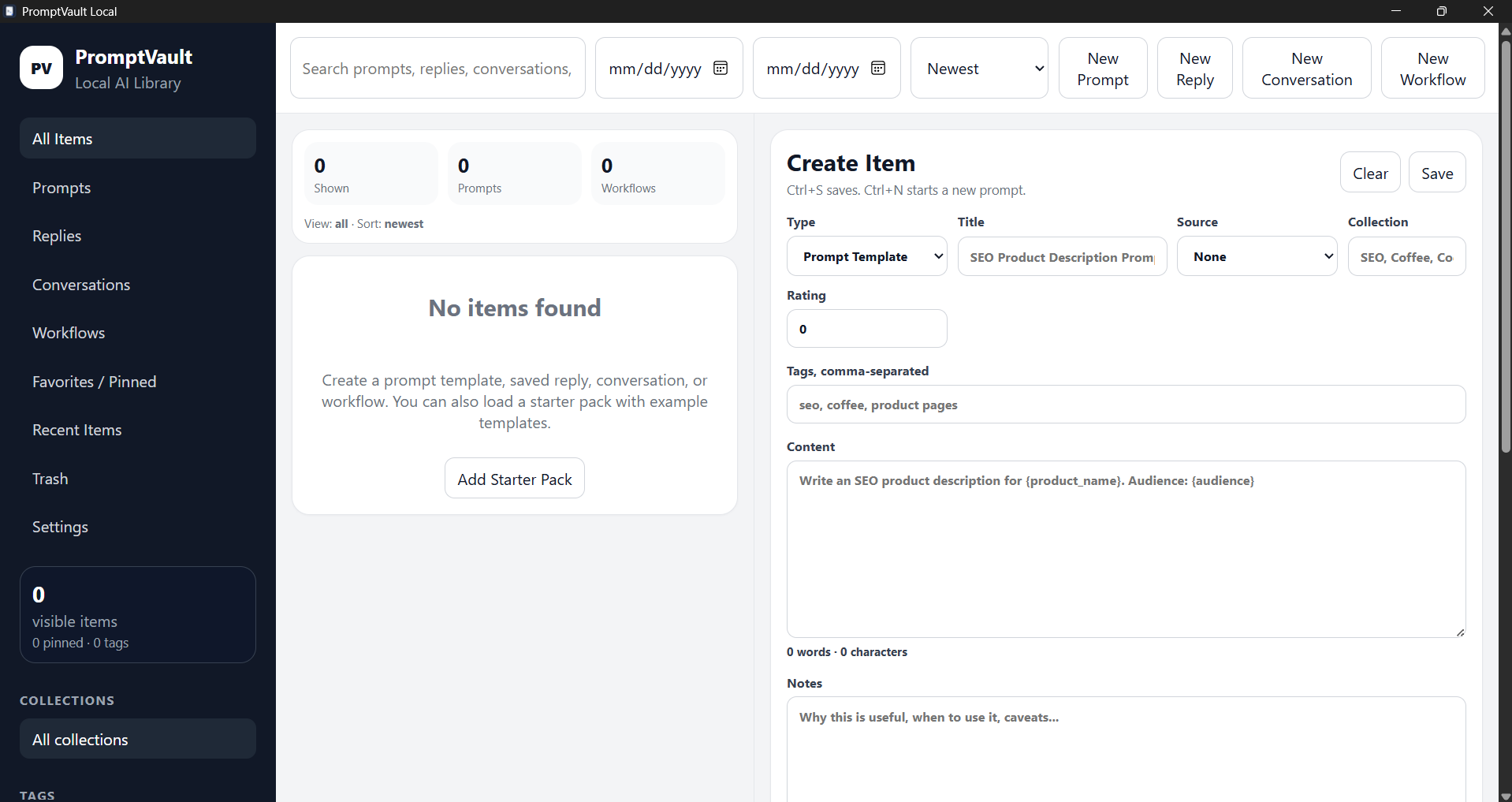
PromptVault Local is a private, local-first desktop app for saving, organizing, searching, and reusing your best AI prompts, AI replies, conversation snippets, reusable instructions, workflow chains, code snippets, brand/style guides, and saved AI outputs.
If you use ChatGPT, Claude, Gemini, Grok, DeepSeek, Copilot, Codex, Perplexity, or other AI tools, PromptVault Local gives you one fast desktop library for everything worth keeping.
Instead of digging through old chats trying to find “that one good prompt” or “that perfect AI answer from last week,” you can save it locally, tag it, organize it into collections, search it instantly, and reuse it whenever you need it.
PromptVault Local is built for creators, developers, marketers, writers, students, entrepreneurs, researchers, SEO workers, content creators, ecommerce store owners, and anyone who uses AI regularly.
What PromptVault Local Helps You Save
PromptVault Local can organize:
- AI prompts
- Prompt templates
- Filled prompt versions
- ChatGPT replies
- Claude replies
- Gemini replies
- Grok replies
- DeepSeek replies
- Copilot/Codex outputs
- Useful AI conversation snippets
- Full conversations
- Reusable instructions
- AI workflow chains
- Brand voice guides
- Style guides
- SEO prompts
- Writing prompts
- Coding prompts
- Debugging prompts
- Marketing prompts
- Product description prompts
- YouTube script prompts
- Blog workflow prompts
- Code snippets
- Saved AI outputs
- Notes and rated responses
Why Use It?
AI tools are powerful, but old chats become messy fast.
You may have hundreds of conversations across different AI platforms, but no easy way to organize the best parts. PromptVault Local solves that by giving you a dedicated local library for your prompts, replies, snippets, workflows, and reusable instructions.
Use it when you want to:
- Save your best AI prompts
- Reuse prompt templates
- Organize AI-generated answers
- Search old AI replies instantly
- Store useful ChatGPT responses
- Keep prompt workflows in order
- Build a personal AI prompt library
- Save brand and style instructions
- Keep SEO prompts ready to reuse
- Store coding/debugging prompts
- Save full conversations or just the useful parts
- Keep everything private and local on your device
Key Features
Local-First and Private
PromptVault Local stores your library on your own computer using a local SQLite database.
There is no required account, no cloud database, and no subscription login.
Your saved prompts, replies, conversations, workflows, backups, and snippets stay on your device.
Fast Prompt and Reply Search
Search your saved AI content quickly by title, content, tags, type, source, rating, favorite status, collection, and recent activity.
Search and filter by:
- Keywords
- Tags
- Item type
- Favorites
- Collections/folders
- Recent items
- AI source
- Rating
- Newest
- Oldest
- Type
This makes it easier to find saved AI replies, reusable prompts, and important conversation snippets without searching through multiple AI chat histories.
Prompt Templates With Variables
Create reusable prompt templates with variables like:
Write an SEO product description for {product_name}.
Audience: {audience}
Tone: {tone}
Target keyword: {keyword}
PromptVault Local detects variables (something in {} ) automatically and creates fill-in fields for you.
You fill in the variables, generate the final prompt, then copy it into your preferred AI tool.
This is useful for:
- SEO product descriptions
- Blog outlines
- YouTube scripts
- Coding prompts
- Debugging prompts
- Email writing
- Marketing campaigns
- Brand voice prompts
- Social media content
- Research prompts
- Repetitive AI workflows
- Any Prompt you want to reuse multiple times but change small portions often
Save AI Replies
Paste and save useful AI responses so you can find them later.
Each saved reply can include:
- Title
- Content
- AI source
- Tags
- Notes
- Rating
- Favorite status
Supported/custom sources include tools like:
- ChatGPT
- Claude
- Gemini
- Grok
- DeepSeek
- Copilot
- Codex
- Perplexity
- Any custom AI source you create
This is useful when an AI gives you a great answer and you know you will want it again later and want to know which AI gave it to you.
Save Full Conversations and Snippets
PromptVault Local can store full conversations or individual useful snippets.
You can save:
- Full AI conversations
- Important replies
- Small reusable snippets
- Specific message sections
- Research notes
- Instructions
- Output examples
Conversation messages can be copied individually or saved as separate snippets.
Tip: if you want to separate who said what follow the following:
[name]:
(message)
Workflow Chains
Build reusable AI workflows made of multiple prompt steps.
Example workflow:
- Keyword research prompt
- Blog outline prompt
- Draft prompt
- SEO rewrite prompt
- Meta title prompt
- Social media prompt
Workflow features include:
- Copy next step
- Copy all steps
- Completion checkboxes
- Progress tracking
- Reset progress
This is useful for repeatable AI processes like blog writing, SEO content, coding tasks, ecommerce product pages, game design planning, research workflows, and marketing systems.
Collections / Folders
Organize saved prompts and replies into collections.
Examples:
- SEO Prompts
- Coding Prompts
- Shopify Content
- Blog Workflows
- YouTube Scripts
- Brand Voice
- Game Dev
- Research Notes
- Business Ideas
- Debugging Help
- Personal Productivity
- Or your own
Collections make it easier to separate different projects, brands, clients, workflows, or use cases.
Tags, Favorites, Ratings, and Bulk Actions
PromptVault Local includes organization tools for larger prompt libraries.
You can:
- Add tags
- Favorite important items
- Rate saved replies
- Sort by rating/source/type/date/favorite
- Bulk favorite items
- Bulk unfavorite items
- Bulk tag items
- Bulk delete items
- Move items to trash
This helps keep large AI prompt libraries manageable.
Import and Export
PromptVault Local supports multiple ways to move data in and out.
Supported options include:
- JSON backup export/import
- Markdown import/export
- CSV export
- Export selected items
- Import Markdown folders
- ChatGPT export JSON import
- Local backup restore
This makes it useful as both a daily prompt organizer and a long-term local archive for AI work.
Backups and Restore
PromptVault Local includes backup tools so your saved prompt library is easier to protect.
Backup features include:
- Manual local backup creation
- Auto-backups while the app is open
- Backup list in Settings
- Restore backup button
- Safety backup before restore
- Local database path display
- Local backup folder path display
You can use backups before importing large files, before testing new organization systems, or before moving data between computers.
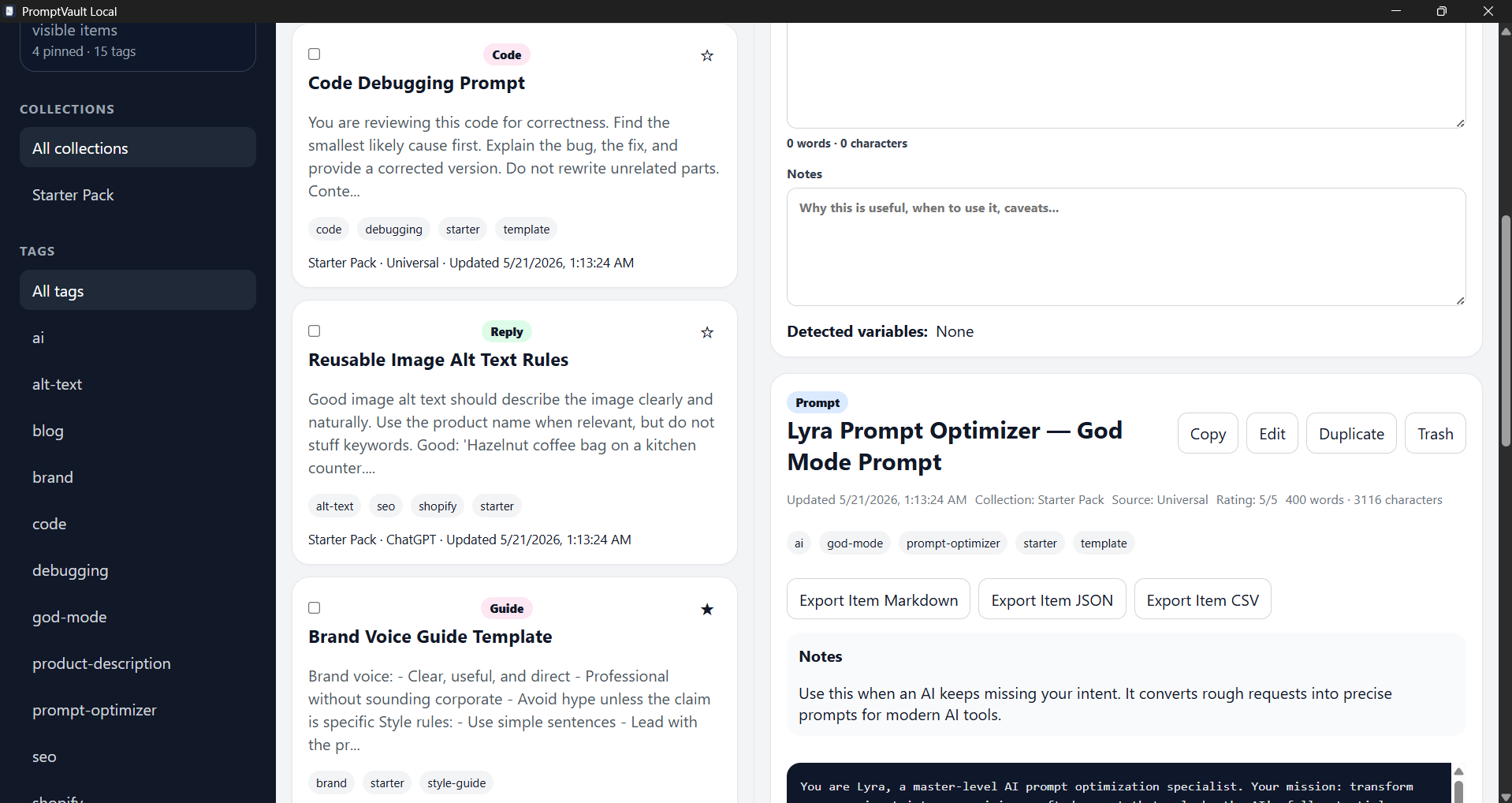
Included Starter Pack
PromptVault Local includes a starter pack to help you learn the app quickly.
The starter pack includes templates and workflows for:
- SEO product descriptions
- Blog post workflows
- Debugging prompts
- Brand/style guide prompts
- Reusable AI workflow structures
- Lyra Prompt Optimizer / God Mode Prompt
The Lyra prompt is an optional advanced prompt-optimization template for users who want to get more precise results from their preferred AI tool. The Lyra Prompt is a well tested and optimized prompt made to make better prompts.
Who This Is For
PromptVault Local is useful for:
- AI power users
- Writers
- Bloggers
- Developers
- Students
- Researchers
- SEO workers
- Marketers
- YouTubers
- Ecommerce store owners
- Shopify store owners
- Small business owners
- Prompt engineers
- Content creators
- Freelancers
- Productivity app users
- People who use multiple AI tools
It is especially useful if you regularly think:
“I know an AI gave me a great answer before, but I cannot find it.”
or:
“I keep rewriting the same prompt over and over.”
Good Use Cases
Use PromptVault Local to build a private library for:
- ChatGPT prompt management
- Claude prompt organization
- Gemini prompt storage
- AI reply saving
- Prompt template reuse
- Local AI workflow organization
- SEO content workflows
- Blog writing systems
- Ecommerce product description prompts
- Coding and debugging prompts
- YouTube content prompts
- Brand voice instructions
- Personal knowledge snippets
- Reusable business instructions
- AI conversation archiving
Privacy Notes
PromptVault Local is designed as a local-first app.
By default:
- Your prompts are saved locally
- Your replies are saved locally
- Your conversations are saved locally
- Your workflows are saved locally
- Your backups are created locally
- No account is required
- No cloud database is required
PromptVault Local does not control what you paste into external AI services. Be careful when copying private or sensitive information into third-party AI tools.
Platform Support
PromptVault Local is available for:
- Windows
- macOS Intel
- macOS Apple Silicon
- Linux AppImage
- Linux Debian/Ubuntu
.deb
Windows has been tested with the installer and desktop shortcut after restart.
macOS builds are early unsigned builds, so macOS may show a Gatekeeper warning.
Linux builds include AppImage and Debian/Ubuntu package options.
Purchase
In order to download this tool you must purchase it at or above the minimum price of $4.99 USD. You will get access to the following files:
Leave a comment
Log in with itch.io to leave a comment.